

Mobile app scope
We reduce the app to the smallest useful release: core flows, roles, data needs, integrations, platform choices and launch constraints.

HQ Paphos, Cyprus · worldwide
99 Francs® develops lean mobile app experiences for startups, SaaS products, AI tools and mobile-first workflows when the goal is a clear first release, not an endless product platform.
Mobile app development from $8,000 (cross-platform MVP).
150+
shipped projects
$32M+
raised by clients
9,000+
tasks delivered
The service covers app scoping, native iOS (Swift) and Android (Kotlin) builds, cross-platform development in Flutter or React Native, core flows, responsive states, integration assumptions, QA notes, App Store and Google Play submission, and a PWA path where a lightweight web app fits.
Each page answers one build question directly — iOS, Android, Flutter or React Native — and routes into a scoped mobile development plan.
Native iPhone and iPad apps in Swift, built to Apple's guidelines and ready for the App Store.
Build for iOSGet an existing iOS app ready for Apple's foldable: audit, 7.6-inch layouts and SwiftUI or UIKit changes.
Adapt for iPhone DuoNative Android apps in Kotlin, built to Material conventions and ready for Google Play.
Build for AndroidOne Dart codebase shipping to iOS and Android with a near-native feel — fast and cost-efficient.
Build with FlutterOne JavaScript/TypeScript codebase for iOS and Android — fast iteration on a familiar React stack.
Build with React NativeThe strongest mobile builds do not start with every possible feature. They start with the app surface that proves the product can be useful, trusted and used repeatedly.
We reduce the app to the smallest useful release: core flows, roles, data needs, integrations, platform choices and launch constraints.
We can build focused mobile apps in React Native or Flutter when one codebase is the practical path to iOS and Android.
When the product needs native behavior, we can scope Swift-based iOS work or platform-specific implementation around the critical flows.
The build includes responsive states, forms, navigation, API handoff assumptions, QA notes and App Store preparation where needed.
We build when the first version has a clear purpose: validate a workflow, support a web product, launch a companion app or prove a mobile-first idea.
We keep the scope tight: fewer features, cleaner architecture, clearer flows and a build plan that prioritizes what users actually need first.
If you already have Figma screens, prototypes or a product design system, we can turn that into a working mobile app surface.
Development stays close to UX. We flag unclear flows, missing states and risky assumptions before they become expensive implementation problems.
We keep the implementation tied to the intended product behavior: clear navigation, reliable states, practical integrations and a first version that can be tested.
We review the product goal, design maturity, APIs, accounts, content, integrations, analytics, platform needs and App Store constraints.
We define the mobile stack, data flow, navigation, state model, component structure and the parts that should stay out of v1.
We implement the screens, navigation, forms, states, integrations and app behavior needed for a credible mobile MVP or companion app.
We review responsive behavior, device states, bugs, content, analytics events, store assets and what the team needs after handoff.
Swift and SwiftUI on iPhone, Kotlin and Compose on Android, with the backends, subscriptions and widgets behind them. Our own products, so every decision in them is ours to explain.
iOS App · Widgets
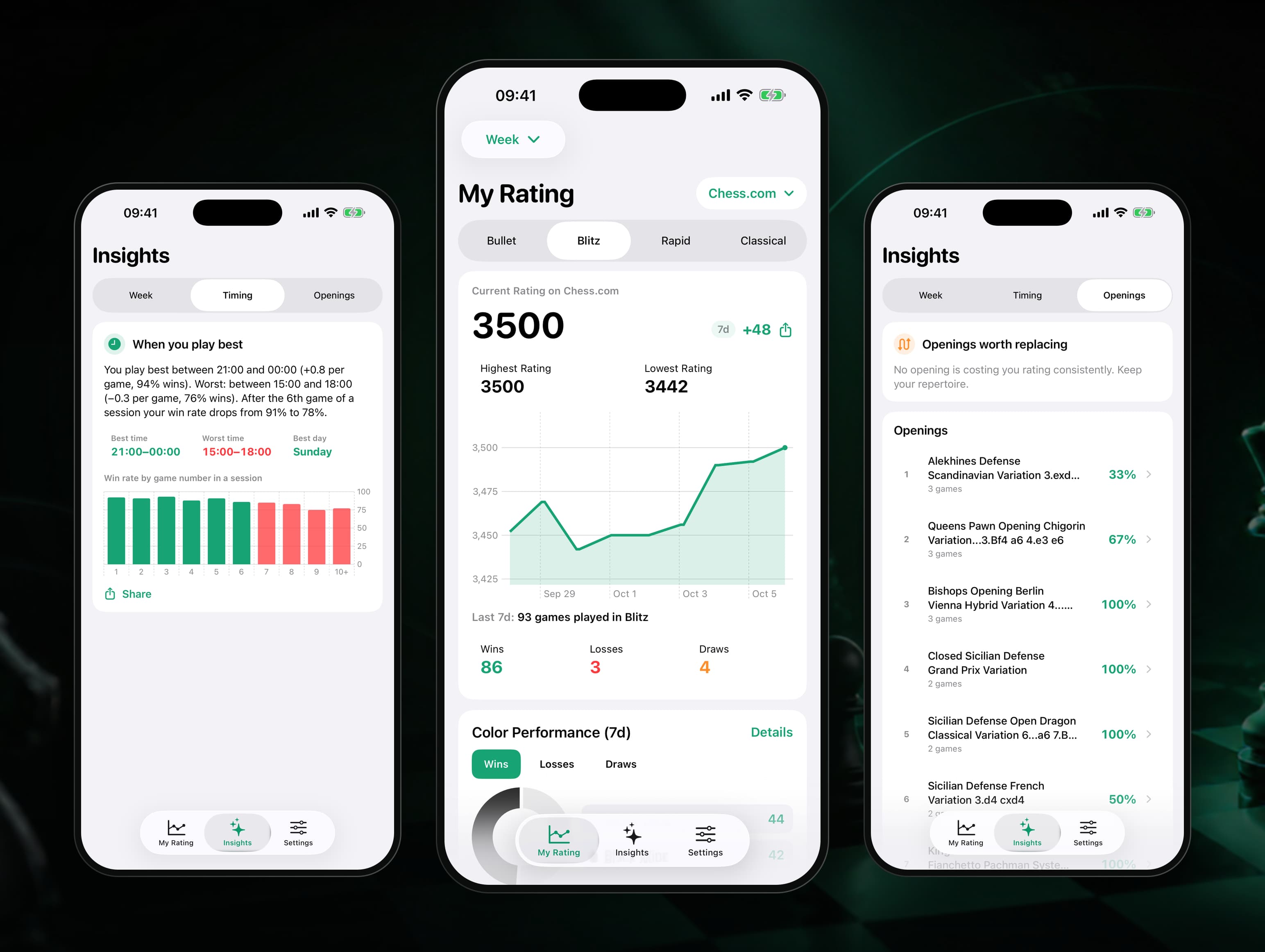
Our own iPhone app and home-screen widget that puts Chess.com and Lichess ratings in one place and explains why they move: tilt check, best hours, openings that cost points, goals and a Sunday report. SwiftUI, WidgetKit and StoreKit 2 on a Node and Postgres backend, designed, shipped and run by 99 Francs.
Android App · VPN
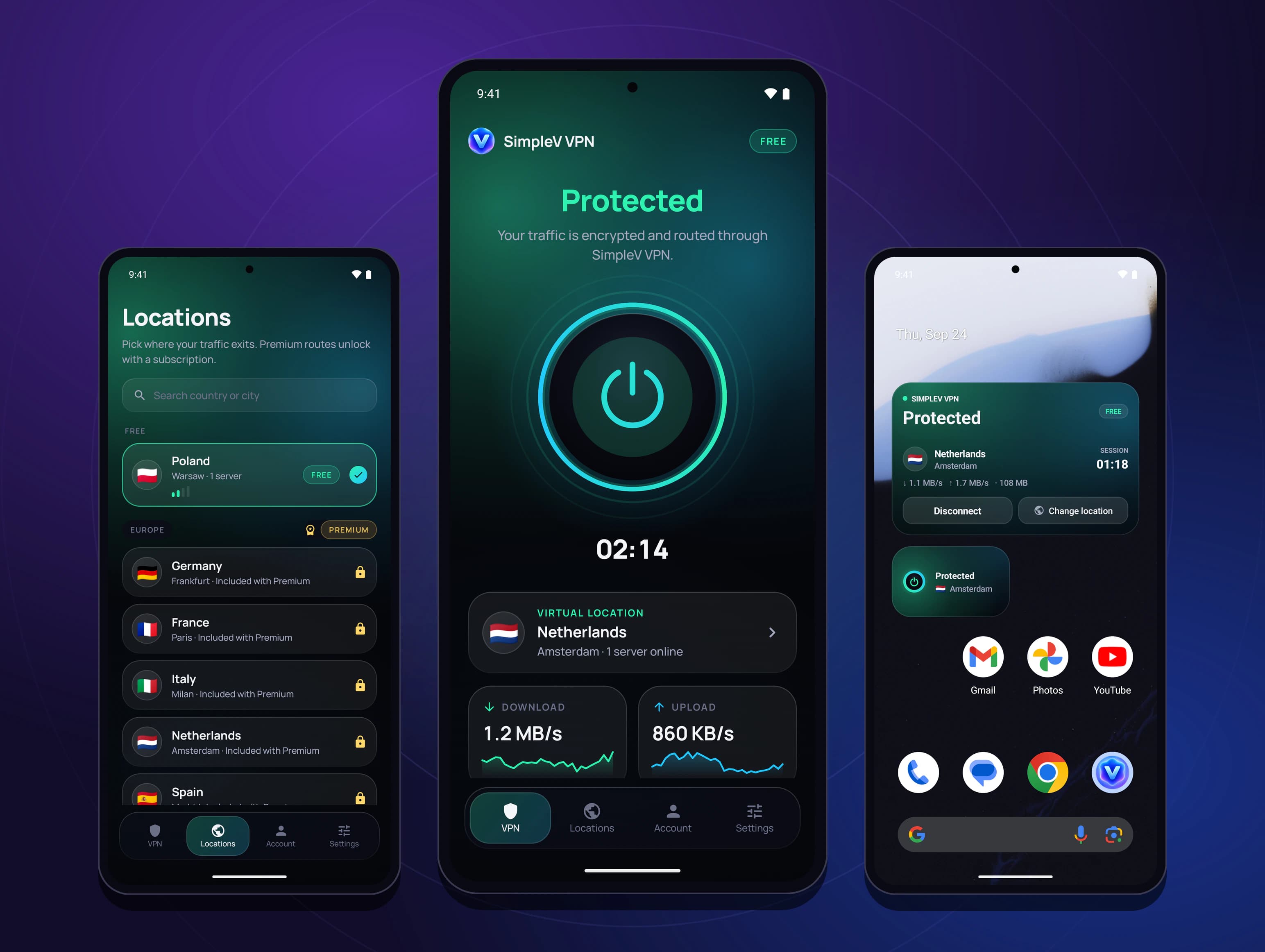
Our own one-tap VPN for Android: no account to start, no traffic logs, WireGuard or Xray Reality to get through networks that block VPNs. A Kotlin and Compose app, an Express and Postgres control plane on Railway and exit nodes on Vultr that start on demand, live on Google Play about two weeks after active work began, plus a Chrome extension that protects the browser on the same accounts.
Mobile App · iOS, Android, Mac, Watch
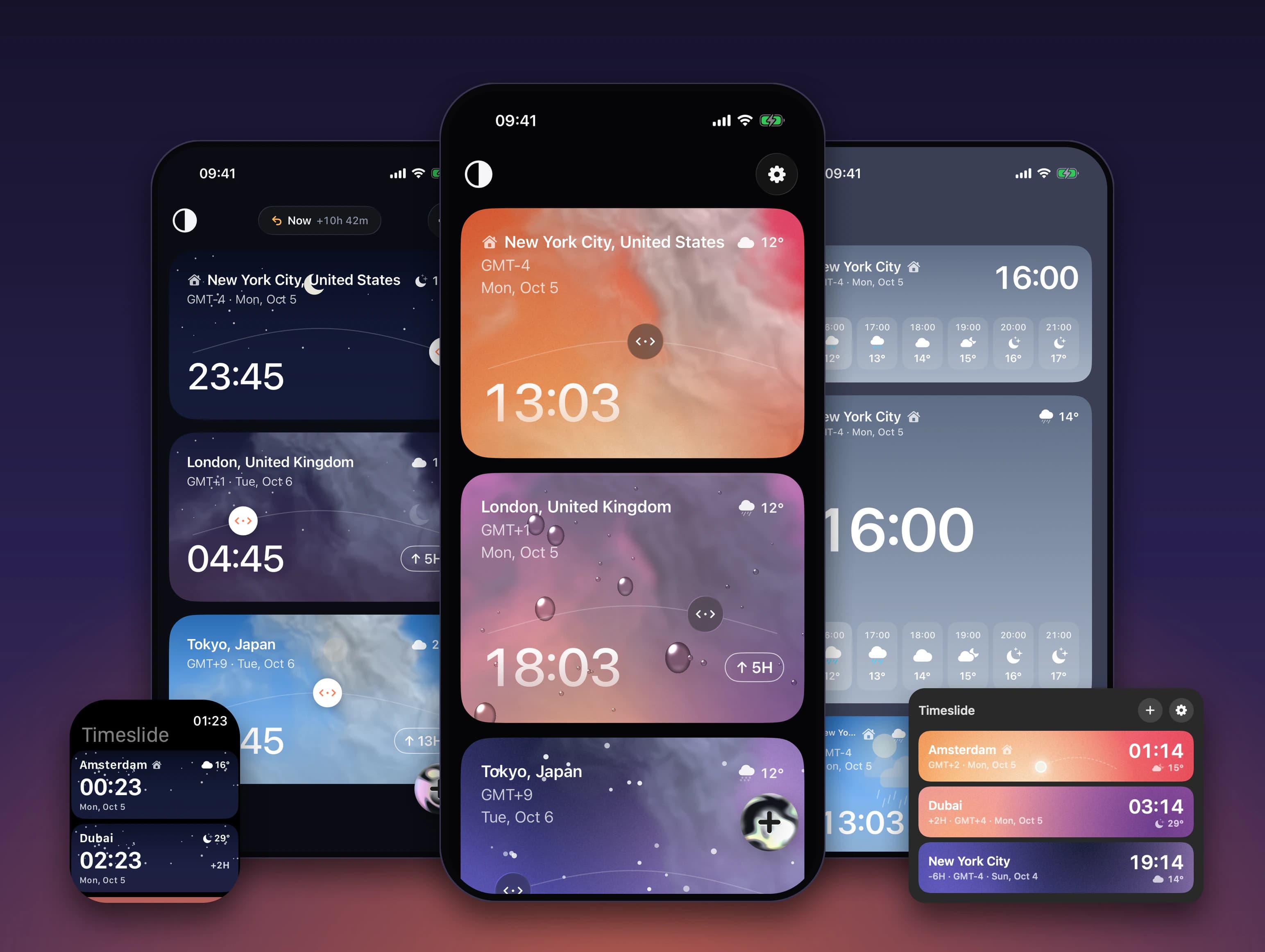
Our own world clock where every city is a card: drag one sideways and a single shared time moves across all of them, with the weather for that hour. Built natively for iPhone, Android, Mac and Apple Watch, with widgets, GPU weather shaders and 8 languages. On the App Store and Google Play.
The code is rarely what holds an Android launch back. Account type, testing rules, target API, 16 KB pages, Data safety, re-signing and review do — notes from shipping six of our own apps to Google Play in 2026.
If the mobile app has a clear job, build the first version around that job and ship it clean.
Yes. If the app UX or UI is not ready, the project should start with mobile app design before development begins.
We build native iOS (Swift), Android (Kotlin), and cross-platform apps in Flutter or React Native. Each has its own page.
Mobile app development starts at $8,000 for a cross-platform MVP. What moves the price is platform choice (native vs. cross-platform), integrations, backend complexity and app-store submission needs. Every build runs in fixed-price phases with no upfront payment — see how we work.
No. Like every 99 Francs project, mobile app development runs in fixed-price phases with no deposit — you pay only once a phase is built and working. See the full breakdown of how we work.